SwiftUI ile Hello World
Tarih: 16/11/2025
Bu rehberde macOS ve iOS için basit bir Hello World uygulaması yapacağız.
Adım adım Xcode ve SwiftUI kullanarak uygulama geliştirmeyi öğreneceksiniz.
1. Xcode Projesi Oluşturma
Xcode'u açın ve yeni bir SwiftUI projesi oluşturun.
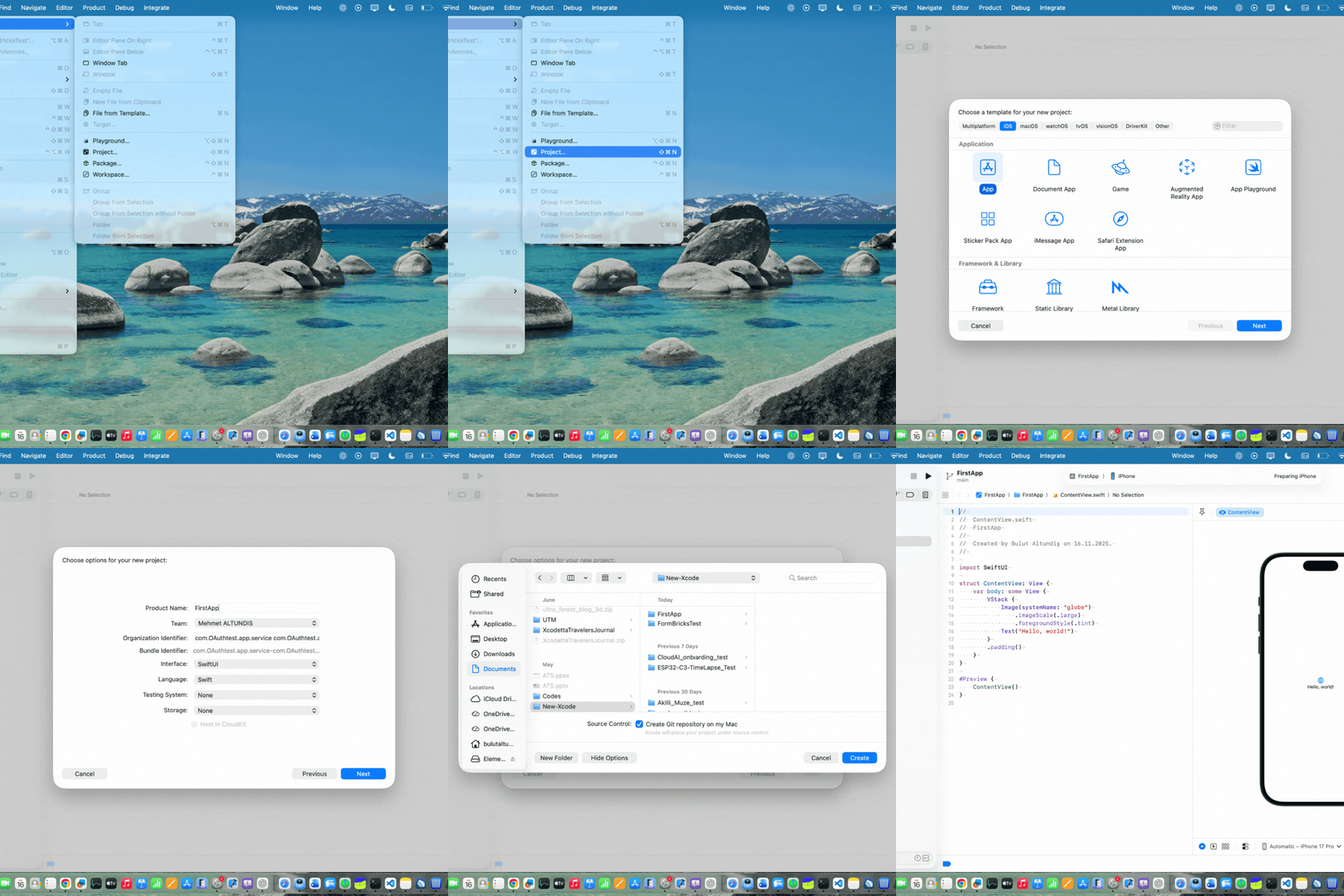
Adımları takip edin:
- File → New → Project
- Platform: iOS veya macOS
- Interface: SwiftUI
- Language: Swift
2. ContentView Oluşturma
ContentView.swift dosyasını açın ve temel UI kodunu ekleyin:
import SwiftUI

struct ContentView: View {
    var body: some View {
        VStack {
            Image(systemName: "hand.wave")
                .imageScale(.large)
                .foregroundStyle(.green)
            Text("Hello, world!")
        }
        .padding()
    }
}

#Preview {
    ContentView()
}